


This post was updated 10/27/2026.
For more than 25 years, I taught computer networking at the community college level. I’ve also written networking and operating system textbooks. I’ve always wished there was a tool that gave students realistic, hands-on networking practice without overwhelming novice learners.
NetEmulator® from DTI Publishing is the kind of tool I wish I’d had in my classroom.
In 2025, NetEmulator® introduced an innovative environment for teaching and learning computer networking. Since then, it has added an extensive range of cybersecurity capabilities. Even though I’ve retired from full-time teaching, I’m still writing networking textbooks, and NetEmulator® will be my go-to for developing virtual labs that supplement physical networking equipment.
What is NetEmulator®?
NetEmulator® is a web-based networking emulation platform that students can access with a web browser and internet connection — no software installation required. With Release 2.0 in August 2026, the platform expanded into cybersecurity, giving students opportunities to practice skills like service enumeration, firewall configuration, access control, network segmentation, traffic analysis, vulnerability assessment, secure protocols, and more.
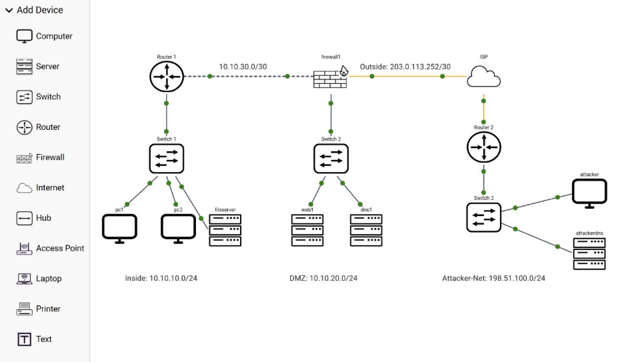
For students, NetEmulator® is easy to use. It visually shows the movement of network data through a network and allows students to configure devices and topologies. Students can work from terminals, configure routers, switches, firewalls, servers, wireless devices, and computers, and then observe what happens as packets move through the environment. It also provides immediate feedback as students work through lab exercises.
For instructors, NetEmulator® is highly customizable. A library of pre-created, self-grading labs can be used with supported courses, while instructors can focus on the topics and skills they believe students most need to master.
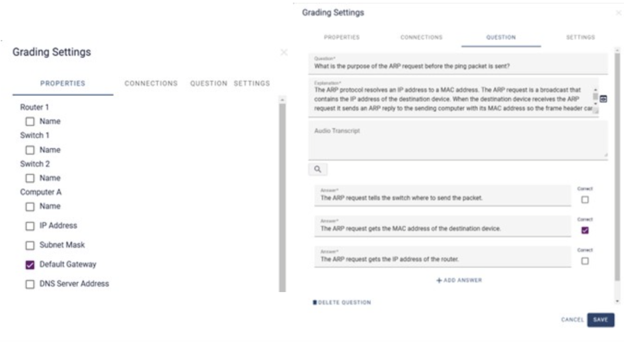
NetEmulator® supports learning networking in multiple ways. If a student becomes stuck on a task, there is a Show Me option that can provide an explanation, instructional guidance, or a short video related to the task at hand. Instructors can also create self-check questions that provide immediate feedback and detailed explanations to validate learning outcomes as students work through individual lab steps.
The vision behind NetEmulator®
Every feature of NetEmulator® was developed with teaching and learning in mind, and that has been the focus of DTI Publishing’s founder Pierre Askmo across all of DTI’s products.
When I asked Pierre why he decided to take on the competition and develop NetEmulator®, he explained:
“We saw a need in the space between educational platforms with a fair amount of learning components but that were static, and highly interactive professional network simulators geared towards engineers, which had hardly any learning features. NetEmulator® merges the two to offer a highly interactive and educational network emulation platform.”
I pressed him further by asking what makes NetEmulator® unique among the competition.
“It’s the ability to add educational features to a network emulation tool. Our platform was developed with students and instructors in mind. It enables instructors to take students from zero to hero at warp speed because NetEmulator® was built specifically for education.”
From what I have seen, that’s spot on.
NetEmulator® has a clean, straightforward interface. Lab instructions appear alongside the devices and other options available to students, while the workspace provides the network environment itself. The workspace can be pre-populated with devices, and those devices can be partially configured depending on the learning objectives of the lab. It can also be left largely empty, so students can add, connect, and configure the necessary devices themselves.
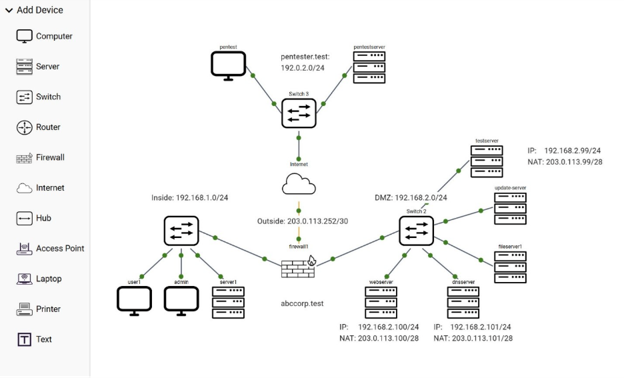
That flexibility is especially valuable for cybersecurity instruction because an instructor can now begin with a network that works but is insecure.
A server might expose an unnecessary service. An ACL might permit traffic that should be denied. Telnet might be enabled where SSH should be used. A firewall might contain an overly permissive rule. A TLS certificate might be expired, untrusted, or issued for the wrong hostname.
In other words, successful connectivity is no longer necessarily the end goal. Sometimes the problem is that communication succeeds when it shouldn’t.
Feedback in action: Helping students understand networking and cybersecurity concepts
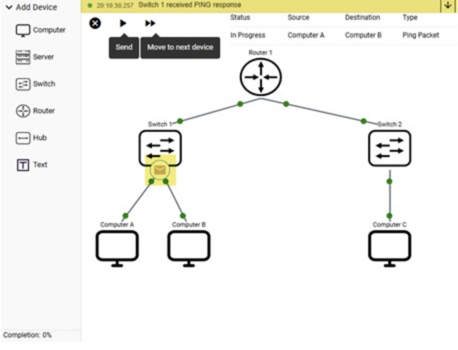
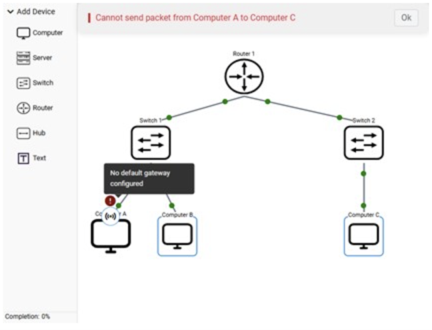
One of the great things about NetEmulator® is the feedback students receive as they watch packets travel from device to device.
Students can see a packet’s current status, source and destination devices, and type. The Network Log provides a running narrative of what is happening as the packet moves through the network. Students can step through that movement one device at a time and examine the packet at different points along its path.
For networking instruction, this allows students to observe ARP, DHCP, DNS, routing, ICMP, and TCP behavior rather than just reading about those protocols.
With the added cybersecurity features, students can take that learning further by comparing normal network traffic with suspicious patterns. They might observe normal DNS queries and responses, for example, then compare them with repeated queries for unusual hostnames that could indicate DNS beaconing.
This is important because cybersecurity monitoring is often about recognizing patterns rather than identifying one obviously malicious packet. Seeing the difference between normal and unusual behavior is valuable in instruction.
The same feedback that helps students troubleshoot networking problems can also help them investigate security issues. Suppose a server exposes several unnecessary services. Students can discover the host, scan it, identify the exposed ports, determine which services are actually required, disable unnecessary services, configure the host firewall, and rescan the server to verify the result.
That sequence mirrors the way security work is performed in the real world: discover, analyze, remediate, and validate.
Students aren’t simply told that reducing the attack surface is important. They actually reduce it and verify that they’ve done so without breaking required services.
Building cybersecurity skills through hands-on practice
NetEmulator® gives students opportunities to practice a wide range of cybersecurity skills within a controlled educational environment.
Students can discover hosts and services, assess potential vulnerabilities, configure ACLs and firewalls, segment networks with VLANs, analyze DNS behavior, and compare secure and insecure protocols. They can also work with NAT, IDS/IPS, host firewalls, network security zones, and certificate trust problems.
Instead of merely reading that Telnet is insecure, for example, students can observe information traveling in plaintext and compare that experience with SSH. Similarly, they can see how HTTP application data is readable in transit, then observe the TLS negotiation that takes place before HTTPS application data is encrypted.
These capabilities make it possible to teach cybersecurity as something students do, rather than something they only read about.
That fits particularly well with a practice-first approach to teaching. Instead of beginning with several pages explaining a security concept, students can first encounter a problem. A student might see plaintext traffic, discover an unnecessary service, or find that an ACL allows traffic that should be blocked. After investigating and addressing the problem, they can connect what they observed to the underlying theory.
For introductory students, that connection between action and theory can make abstract concepts much easier to understand.
How instructors can personalize learning with NetEmulator®
NetEmulator® provides instructors with tools for creating structured learning experiences. Lab instructions can include text and audio. Show Me content can provide explanatory text, instructional video, and other assistance.
In Studio Mode, the topology can be configured with an initial state representing what students encounter when they begin a lab and a correct state representing the configuration expected after they complete the work.
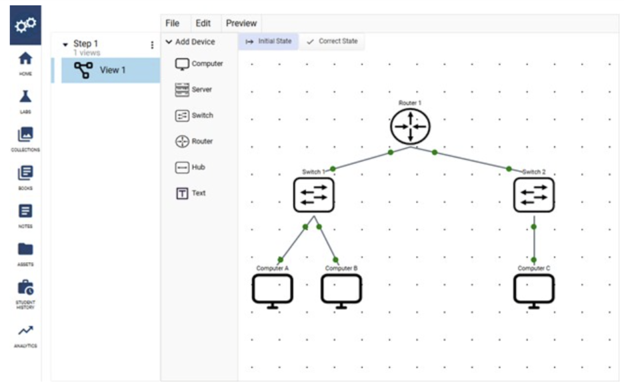
That makes it possible to create troubleshooting and cybersecurity scenarios in which students do not necessarily know what is wrong when they begin. The environment itself becomes part of the question. They must inspect the environment, gather information, form conclusions, make changes, and validate those changes.
Grading can also be tied directly to configuration tasks, an important distinction from traditional multiple-choice assessments. A multiple-choice question can determine whether a student knows what least privilege means. A NetEmulator® lab can determine whether the student can actually configure a network according to least privilege and verify that prohibited traffic is blocked.
That is an important difference. Students are demonstrating skills rather than just recognizing terminology.
What’s next: LabForge is coming with Release 3.0
Development is continuing with LabForge, coming to NetEmulator® with Release 3.0 in November 2026. The new feature will use AI assistance to help instructors modify existing labs or create new ones around specific networking and cybersecurity learning objectives.
Instructors will be able to change topologies, introduce different misconfigurations, adjust difficulty, add or remove tasks, and customize scenarios to better align with how they teach a topic.
The intention isn’t to remove instructors from lab design. The instructor remains the subject-matter expert and determines what students should learn. LabForge is designed to reduce the technical effort required to turn those instructional objectives into interactive labs.
Bring NetEmulator® into your course
NetEmulator® is available in several MindTap courses and coming soon to more.
Now available:
- Tomsho’s “Guide to Networking Essentials,” 9e
- Andrews’ “CompTIA A+ Guide to IT Technical Support,” 12e
Coming soon:
- Tomsho’s “Microsoft Exam AZ-802: Guide to Windows Server Hybrid Administrator,” 1e
- Ciampa’s “CompTIA Security+ Guide to Network Security Fundamentals,” 8 e
- Ciampa’s “CompTIA CySA+ Guide to Cybersecurity Analyst,” 4e
Start exploring courses in the Cengage Instructor Center, or connect with your Cengage representative for a personalized walkthrough.
Written by Greg Tomsho, author of “Guide to Networking Essentials” 9e and “Microsoft Exam AZ-801: Guide to Configuring Windows Server Hybrid Advanced Services” 1e.
Discover more computing, IT, and networking courses that give students hands-on experience building job-ready skills from Cengage.