


Students want to know that what they’re learning today will matter tomorrow. At the same time, instructors want meaningful ways to help students connect course concepts to the skills they’ll use in their careers.
Making these connections shouldn’t require adding disconnected learning tools or completely redesigning your course. That’s why Cengage is bringing career readiness directly into learning experiences in MindTap.
Making career readiness central to learning
Supporting career readiness should be a consistent, visible part of the learning experience — not just a single assignment. New career readiness features in MindTap help students repeatedly connect course knowledge to career skills, practice applying what they know, and build confidence for their futures.
MindTap career readiness features at a glance:
Career Competency Mapping makes skill development visible.
Workplace Simulations give students realistic opportunities to practice workplace skills.
Applied Learning experiences help students apply discipline-specific knowledge in realistic contexts.
Explore how Career Competency Mapping, Workplace Simulations, and applied learning activities can help you create stronger paths between what your students learn and what they’ll do in the workforce below.
Want a tailored look at career readiness features designed for your course? Connect with your Cengage rep.
“As an educator, I believe students learn best when they have opportunities to apply knowledge rather than simply memorize information. Bringing career competency mapping, realistic simulations, and applied learning activities into MindTap has the potential to help students make meaningful connections between academic concepts and the practical skills they will use throughout their careers.” — Tracy Daly, Adjunct Professor, California State University San Marcos, San Diego Mesa College, and National University
Connect coursework to career skills
Career readiness begins with helping students see how what they’re learning develops skills they’ll use beyond the classroom.
Career Competency Mapping makes those connections between coursework and career skills clear. Available in supported MindTap courses, this mapping feature shows how select activities align with specific career readiness competencies from the National Association of Colleges and Employers (NACE).
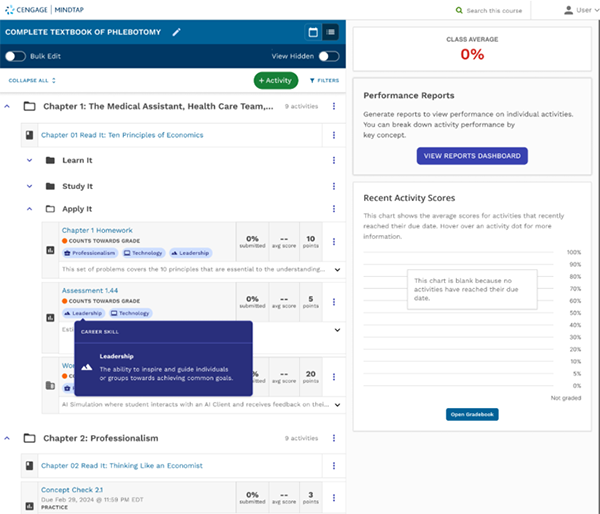
For instructors, Career Competency Mapping shows where students are already developing career skills, from leadership to communication to problem-solving, throughout their courses. This helps reinforce the career relevance of coursework without additional setup or work.
For students, the feature helps answer the question: How will I use what I’m learning? Students get a clearer picture of how course activities help them build skills for their futures.
Where to find it: Career Competency Mapping is available within select MindTap courses across a broad range of disciplines: Automotive, Counseling, Health, Health Information Management, Health Sciences, Information Technology, Marketing, Medical Insurance, MIS, and Psychology.
Look for competency tags on supported activities in the Learning Path or filter activities by career skills. Connect with your Cengage rep to see if Career Competency Mapping is available for your course.
Give students practice building skills in realistic workplace situations
Seeing the connection between coursework and career skills is an important first step. Students also need opportunities to apply those skills.
Workplace Simulations in MindTap give students a low-stakes environment to practice responding to realistic professional situations before encountering similar challenges in the workplace.
Students enter a workplace scenario, take on a defined role, and interact with an AI-supported character using voice or text. During the experience, students need to communicate professionally, think critically, and make decisions or respond to a workplace challenge.
After completing the simulation, students receive structured feedback on their response with suggestions for improvement. Students are encouraged to reflect on what they learned and how they can approach situations differently in the future.
Workplace simulations are directly connected to course concepts, bringing authentic practice into learning without requiring a separate platform. A typical simulation takes approximately 15–20 minutes.
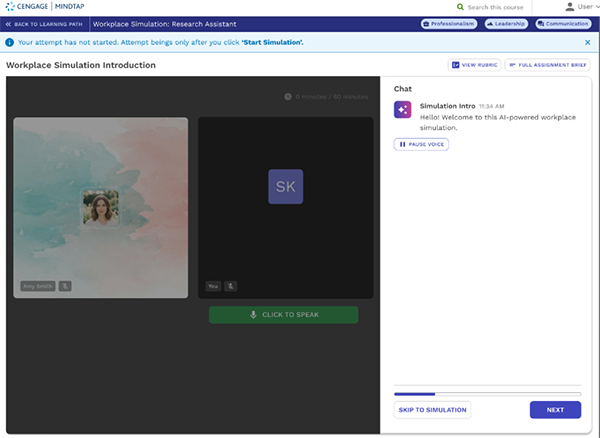
Where to find it: Workplace Simulations are available in the Learning Path in select MindTap courses across a range of disciplines: Automotive, Counseling, Health, Health Information Management, Health Sciences, Information Security, Marketing, Life Sciences Health, Medical Insurance, MIS, Networking and Security, Psychology, and Sports / Leisure / Health. Connect with us to check availability for your course.
Help students learn by doing with applied learning activities
Learning by doing is a powerful experience for students, especially when they’re getting practice with real-world workplace tasks. But giving students realistic experiences looks different in every discipline.
Applied learning activities in MindTap give students opportunities to apply course concepts in discipline-specific, career-focused contexts. Designed around skills, tools, and decisions that matter within the course and beyond, applied learning activities range from challenging students to troubleshoot a computer network to making informed business decisions.
Here are a few examples of applied learning activities:
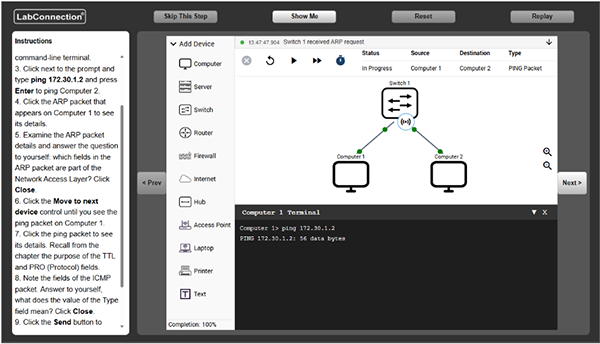
- Network Emulations in IT and Networking: Students configure and troubleshoot realistic networks, examine network behavior, and practice scenario-based problem-solving.
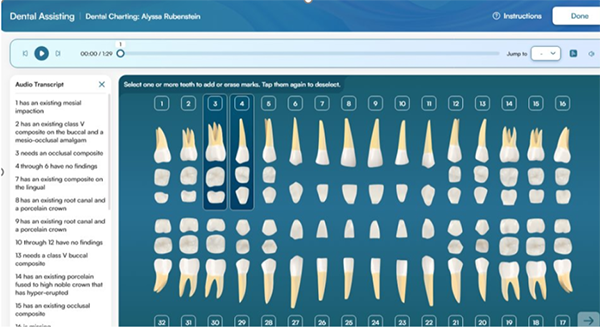
- Dental Charting Simulations in Dental Assisting: Students practice charting simulated patient observations using the language and symbols used in dental practices.
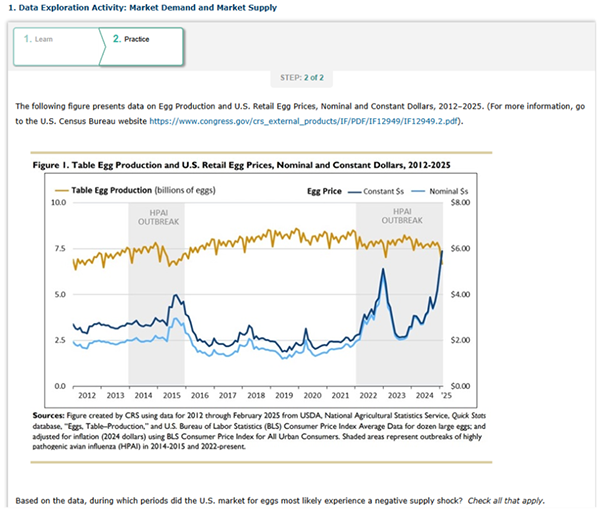
- Data Exploration Activities in Economics: Students analyze and interpret economic data from sources such as FRED and the Bureau of Labor Statistics and apply those skills in context.
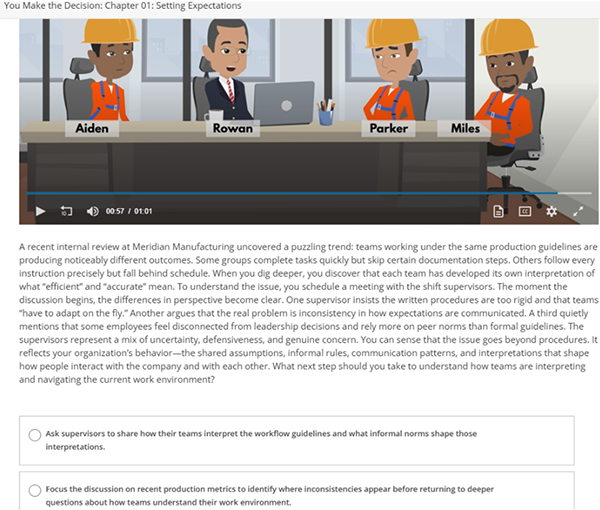
- You Make the Decision simulations in Business and Management: Students make decisions in realistic business scenarios and see the consequences of their choices unfold.
Applied learning activities vary by discipline and course, but they share a common goal: take students from understanding concepts to applying what they know.
For instructors, these activities provide more opportunities to bring applied practice into learning within their existing MindTap course. For students, they offer another chance to deepen their understanding of how they’ll use concepts beyond the course.
Applied learning activities are currently available or rolling out across select courses in Computer Science, Decision Sciences, Dental Assisting, Economics, Education, Finance, Introduction to Computing, Introductory Business, IT and Networking, Management, Marketing, Psychology, and Sociology. The location of these activities varies by course. Please connect with your rep to check availability in your course.
Make it easier for students to see where learning can take them
Career readiness begins long before a student graduates and starts their job search. It grows through the experiences they have throughout their education.
With MindTap, you can show students how what they’re learning is relevant to their futures and build career-ready skills through realistic workplace practice.
